
Convert documents
Convert JPG to PDF
Convert JPG to PDF with up to 50 images and optional searchable text.
Choose files
Choose up to 50 JPG, PNG or WebP images, 120 MB in total.
Collect document photos in one PDF
Review your photos, put them in order and save them as one document. Choose a searchable PDF if you want to find and copy the printed words later.
Keep the shape of each photo
Each reviewed image becomes one PDF page with the proportions left after cropping and rotation. A tall receipt stays tall and a wide photo stays wide, without an A4 or Letter frame around it.
You can combine portrait and landscape images. Check that every required page is included and reorder the photos if the file picker supplied them in the wrong sequence.
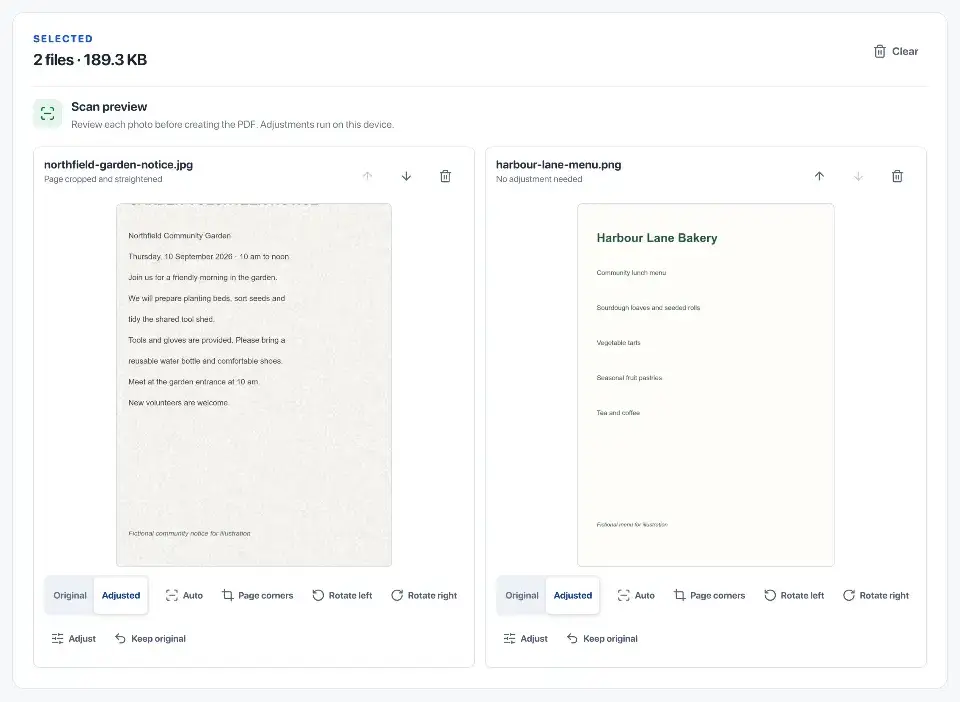
Review the crop and page appearance
The review screen shows the original beside the enhanced preview. Adjust the four crop corners, correct orientation and change brightness or contrast before approving a page.
Check faint text and page edges carefully. A suggested crop or enhancement can remove a needed mark or make pale writing harder to see; compare it with the original before accepting it.
Choose searchable or image-only output
Searchable and optimised compresses the reviewed images, recognises printed text and adds a hidden text layer. The tool checks the finished PDF’s pages and searchable text before offering a download.
OCR can misread names, dates, amounts, handwriting or faint print. Search and copy a few important details to check them. Choose image-only PDF when you only need the visible pages and want to skip recognition.

Check the completed photo bundle
Open the saved PDF in another reader and check page order, crop, orientation and any recognised text you will rely on. Keep the source photos until you have reviewed the result.
Review, optimisation and OCR run in this browser. The selected photos and recognised words are not sent to a document-processing server.
Questions
How are several images combined?
Choose up to 50 images, arrange them in the required page order and create one PDF.
Which image formats can be mixed?
JPG, PNG and WebP images can be combined in the same PDF.
How are transparent PNG areas handled?
Transparent areas are placed on white in the PDF.
How is a searchable PDF created?
Searchable mode compresses the reviewed images, then adds an OCR text layer. Check copied names, dates and amounts because blur, glare and handwriting can be misread.
Are HEIC photos accepted?
Not directly. Save or export them as JPG first, then add them to the tool.